You can make a seating chart for free: it takes a browser, a few minutes and no account. Our free seating chart maker lets you place tables, seat your guests and export the finished plan as a PDF, whether it is a wedding reception, a classroom layout or a corporate dinner.
This guide walks you through the steps, shows what the free version includes, and is honest about what costs extra and when paying is worth it.
Looking for a ready-made layout? Start from one of our free seating chart templates for weddings, banquets, classrooms and offices — the tables and seats are already placed, you add the names.
How to Make a Seating Chart for Free, Step by Step
- Open the builder. Go to seatplanning.com/free-seating-chart. There is nothing to install and no account to create.
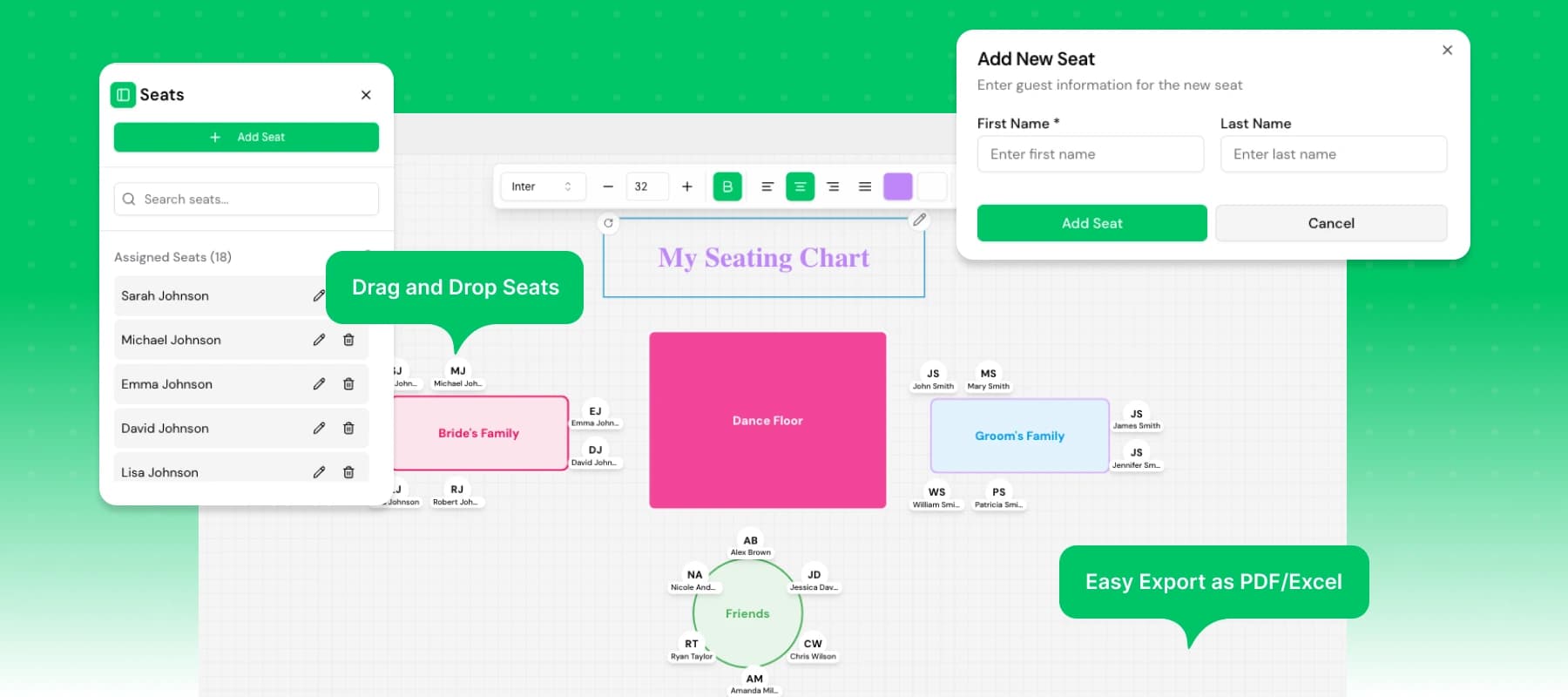
- Add your tables. Create circular or rectangular tables and drag them to match your venue's real floor plan. Rotate and resize them to fit tight spaces, and snap and align elements so the plan looks deliberate, not hand-drawn.
- Seat your guests. Assign guests by first and last name. Changed your mind? Drag a guest to another seat to fix a placement without starting over.
- Label key areas. Mark dance floors, stages or VIP zones with free areas, and use text boxes to label tables, sections or instructions.
- Export your plan. Save the layout as a PDF in one click. On the free tool the PDF carries a watermark.
- Come back anytime. Changes are saved automatically in your browser. No data is uploaded or stored on our servers.
Prefer not to start from an empty canvas? Open a ready-made seating chart template instead — a 40-guest wedding, a 30-student classroom or a 10-seat banquet round, with the tables and seats already placed. You just add the names.
What the Free Version Includes
The free version of SeatPlanning focuses on simplicity — no login, no complexity, and no ads. It is a full drag-and-drop canvas, and this is what is included:
| Feature | Description |
|---|---|
| 🪑 Tables | Create circular or rectangular tables for your layout |
| 👥 Seats | Assign guests by first and last name, and drag them between seats |
| 🟢 Free areas | Mark dance floors, stages, or VIP zones |
| 📝 Text | Label tables, sections, or instructions |
| 📤 Export | Save as PDF in one click (watermarked on the free tool; Excel comes with an Event Pass or a paid plan) |
| 💾 Auto-save | Everything is saved locally in your browser |
Who the free version suits
- Teachers: Build a classroom seating chart in minutes, with desks in rows, pairs, pods or a horseshoe
- Wedding planners: Arrange tables and family groups easily — see how wedding seating charts work end to end
- Corporate teams: Plan event spaces or team dinners, or read up on corporate event seating
- Small business owners: Organize workshops, private events, or a full conference seating plan
- Professional planners: Running several client events at once? That is what seating charts for event planners covers
What Costs Extra (and When It's Worth It)
The free version is deliberately simple: one layout, in your browser, no account. You only need to pay when the chart has to do more than get printed:
- You need a clean PDF or a spreadsheet. A watermark-free PDF and Excel export come with an Event Pass or a paid plan.
- You want your plan saved in the cloud. Free charts live in your browser only. Saved cloud projects need an account on the full platform.
- You are collecting answers from guests. Guest import from Excel or CSV, online RSVP collection and branded email invitations are part of the full platform.
- You are running the door. QR tickets and check-in at the entrance are on the full platform.
- Others are working on the plan. Team collaboration is a full-platform feature.
If you only need a printed plan for one small event, the free version is usually enough. Once guests, replies and the door become part of the job, the full platform saves you from juggling spreadsheets. Everything in that list is live now — see the help center for step-by-step guides, or the pricing page for current plans.
Free vs. Paid at a Glance
| Free builder | Full platform | |
|---|---|---|
| Drag-and-drop canvas | ✅ | ✅ |
| PDF export | ✅ Watermarked | ✅ Watermark-free with an Event Pass or paid plan |
| Excel export | ❌ | ✅ With an Event Pass or paid plan |
| Account required | ❌ No | ✅ Yes |
| Saved cloud projects | ❌ Browser only | ✅ |
| Guest import from Excel/CSV | ❌ | ✅ |
| Online RSVP collection | ❌ | ✅ |
| Branded email invitations | ❌ | ✅ |
| QR tickets & door check-in | ❌ | ✅ |
| Team collaboration | ❌ | ✅ |
Ready to begin? Open the free seating chart maker and have a first layout on screen in five minutes — you can always upgrade later when the event grows into RSVPs, invitations, and check-in.
Frequently Asked Questions
How do I make a seating chart for free?
Open the free builder in your browser, add circular or rectangular tables, seat guests by name, label areas with text, and export a PDF. No signup or install is needed, and your work is saved locally in your browser. The free PDF is watermarked.
Is SeatPlanning's seating chart maker free?
Yes, the free version lets you create and export seating charts without signing up or paying. You can add tables, seats, and labels, and export a watermarked PDF. Excel export and watermark-free PDFs come with an Event Pass or a paid plan. This version will be forever free.
Does the free seating chart maker support drag and drop?
Yes. The free builder is a full drag-and-drop canvas. You can drag tables anywhere on the floor plan, drag guests between seats, and rotate or resize tables, areas, and labels. It runs in the browser with nothing to install.
Who can use the free seating chart maker?
Teachers, wedding planners, event organizers, and small businesses can all use the free tool to design seating layouts quickly and easily.
Does SeatPlanning store my data?
No, all data in the free builder is saved locally in your browser for privacy and simplicity. Nothing is uploaded to external servers. Cloud projects on the full platform are stored to your account.
What costs extra beyond the free version?
The full SeatPlanning platform adds saved cloud projects, guest import from Excel or CSV, online RSVP collection, branded email invitations, QR tickets with door check-in, and team collaboration. All of these are available today. Excel export and watermark-free PDFs come with an Event Pass or a paid plan.
Related reading
- Best Seating Chart Software in 2026: Compare Top Tools
- Seating Chart App Tour: How to Create & Manage Seating Charts
- How to Make a Wedding Seating Chart: The Complete Guide
- Wedding seating charts — the full workflow, from guest list to printed plan
- Seating charts for event planners — managing multiple client events