Exporter la liste des invités en PDF
Transformez votre plan de table en un PDF propre et prêt à imprimer. Choisissez un modèle, ajustez la mise en page, prévisualisez en direct et téléchargez.
Une fois votre plan prêt, vous pouvez l'exporter en PDF imprimable pour le remettre à votre lieu de réception, votre traiteur ou l'accueil. Ouvrez votre plan et allez dans Export.
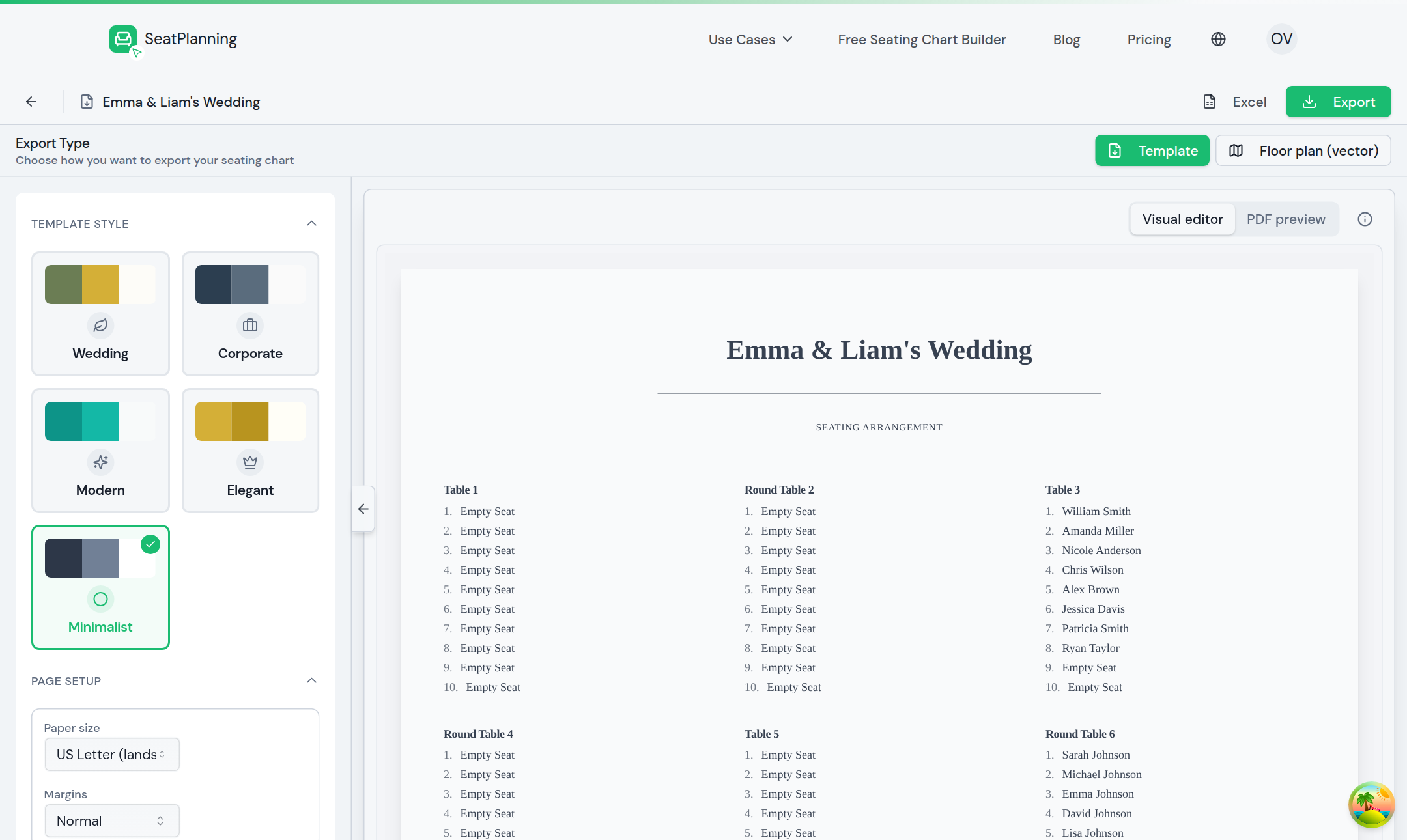
- 1Choisissez quoi exporter : une liste d'invités (Modèle) ou un plan de salle.
- 2Choisissez un style de modèle adapté à votre événement.
- 3L'aperçu se met à jour en direct à chaque changement.
- 4Téléchargez le PDF une fois satisfait du résultat.
Choisissez quoi exporter
En haut, choisissez votre type d'export :
- Modèle vous donne une liste d'invités mise en forme, regroupée par table.
- Plan de salle vous donne une version imprimable de la disposition de vos tables.
Personnalisez la mise en page
Choisissez un style de modèle adapté à votre événement, puis définissez le format de page et les marges dans la mise en page. L'aperçu à droite se met à jour au fur et à mesure, pour que vous voyiez exactement ce que vous obtiendrez.
Vous pouvez basculer entre l'éditeur visuel et un aperçu PDF pour vérifier le rendu final avant de télécharger.
Téléchargez
Quand tout vous convient, sélectionnez Export pour télécharger votre PDF. Vous préférez un tableur ? Utilisez plutôt l'option Excel pour télécharger votre liste d'invités dans un fichier que vous pouvez ouvrir dans n'importe quel tableur.
Pour aller plus loin
- Prendre en main l'éditeur si vous devez encore finaliser votre plan.