Gäste mit dem Scanner einchecken
Nutze den Einlass-Scanner, um Gäste über ihr digitales Ticket einzuchecken, sieh dabei Einlassstatistiken live aktualisiert und setze einen Check-in zurück, wenn du das falsche Ticket scannst.
Der Einlass-Scanner macht aus jedem Telefon oder Tablet deinen Check-in-Punkt. Richte die Kamera auf den QR-Code eines Gastes, und der Scanner bestätigt sein Ticket, checkt ihn ein und aktualisiert deinen Einlasszähler für alle, die mitsehen.
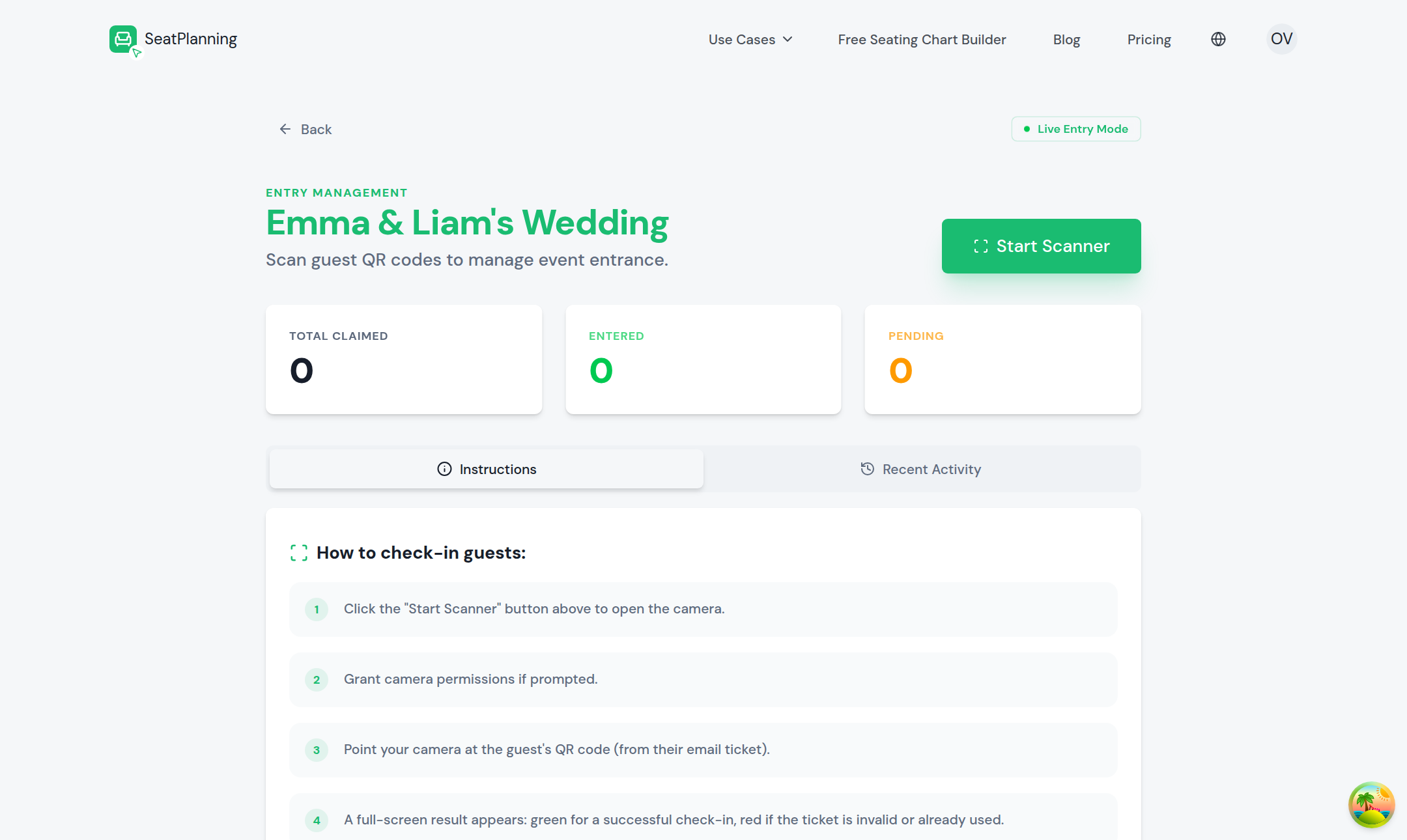
- 1Starte den Scanner, um deine Kamera zu öffnen.
- 2Live-Zähler: beansprucht, eingetroffen und ausstehend.
- 3Schritte auf dem Bildschirm zum Einchecken von Gästen.
Den Scanner öffnen
- Öffne deinen Sitzplan und gehe zum Einlassbereich.
- Wähle Tickets scannen, um den Live-Einlassmodus zu starten.
- Erlaube den Kamerazugriff, falls dein Browser danach fragt.
Lass den Scanner während des gesamten Events auf dem Gerät geöffnet, das du am Eingang verwendest. Du kannst ihn auf mehreren Geräten gleichzeitig öffnen, wenn du mehrere Einlasspunkte hast.
Ein Ticket scannen
- Richte die Kamera auf den QR-Code des Gastes, auf seinem Telefonbildschirm oder einem Ausdruck.
- Der Scanner erkennt den Code und zeigt den Namen des Gastes an.
- Er markiert ihn sofort als eingetroffen.
Ist der Code nicht lesbar, halte das Gerät ruhiger oder bitte den Gast, die Bildschirmhelligkeit zu erhöhen. Ein bereits verwendetes Ticket zeigt eine klare Meldung "bereits eingecheckt", statt den Gast erneut einzuchecken.
Einlassstatistiken live mitverfolgen
Während du scannst, aktualisieren sich Einlasszähler und Scan-Verlauf in Echtzeit, sodass jeder, der auf den Sitzplan schaut, nicht nur die Person mit dem Scanner, die aktuellen Zahlen sieht. Das ist nützlich, wenn jemand die Teilnehmerzahl von einem Laptop aus im Blick behält, während eine andere Person am Eingang scannt.
Der Scan-Verlauf listet jeden Check-in mit dem Namen des Gastes und seiner Ankunftszeit auf, sodass du bei Bedarf im Nachhinein nachsehen kannst, wann jemand angekommen ist.
Einen Check-in zurücksetzen
Scannst du das falsche Ticket, oder muss ein Gast gehen und auf eine Weise zurückkommen, die dein Event erlaubt, kannst du seinen Check-in zurücksetzen.
- Finde den Gast im Scan-Verlauf oder in der Gästeliste.
- Wähle Check-in zurücksetzen.
- Sein Ticket wird wieder gültig zum Scannen.
Wie es weitergeht
- QR-Tickets und Einlass aktivieren, falls du den QR-Modus noch nicht eingeschaltet hast.
- Claim-Links und Ablauf, um zu verstehen, wie Gäste überhaupt zu ihren Tickets kommen.
- Das Ticket eines Gastes erneut senden, falls ein Gast ohne seinen QR-Code ankommt.